 Suraj Tripathi
2019-09-27
Session Management in Site using Apex
Overview
Salesforce Sites provide built-in registration and login logic. Default Lightning Platform-branded VisualForce pages are associated with registration, login, forgot password, and password changes. You can modify these pages or replace them with your own.Create your custom login page in VisualForce, and associate it with your site. You can also create custom VisualForce pages for password, forgot password, and self-registration. You can add these login pages to your site regardless of the template.
Steps:
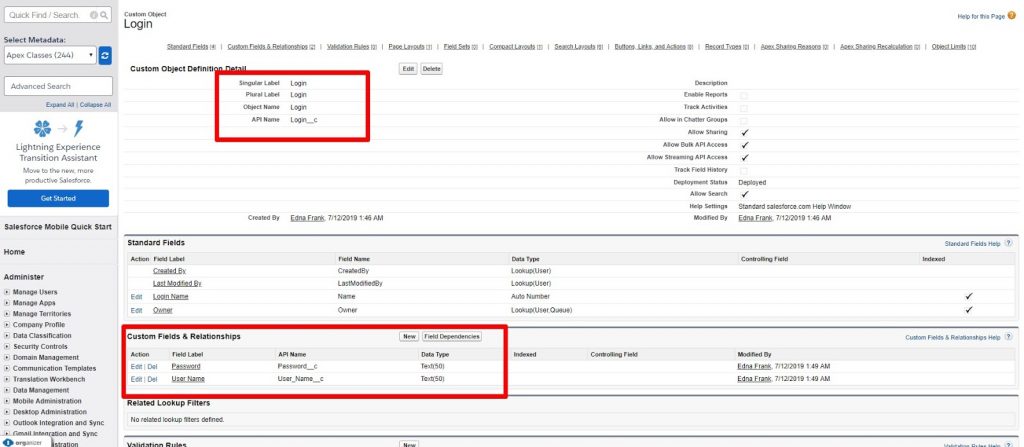
- Create A custom object with fields: Go to the setup and type Custom object into the Quick Find and click on the custom object and fill the details of the custom objects and the name as Login that has two fields: User Name & Password.
 2. Create a visual-force login page (
Login_Page.vfp): Go to the developer console. Click on the File->New->VisualForce Page. Give the name of the VisualForce page and save it.
Copy this code into your VisualForce page and save it.
<apex:page standardStylesheets="true" sidebar="false" applyBodyTag="false" showHeader="false">
    <h2> Welcome to the Page. </h2>
</apex:page>
3. Create an Apex class controller for login page (Login_Page_Controller.apxc): Go to the developer console. Click on the File->New->Apex Class. Give a name of the class and save it.
Copy this code into your VisualForce page and save it.
public class Login_Page_Controller {
}
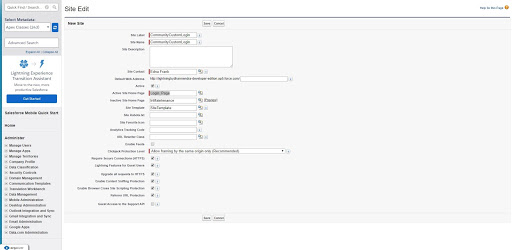
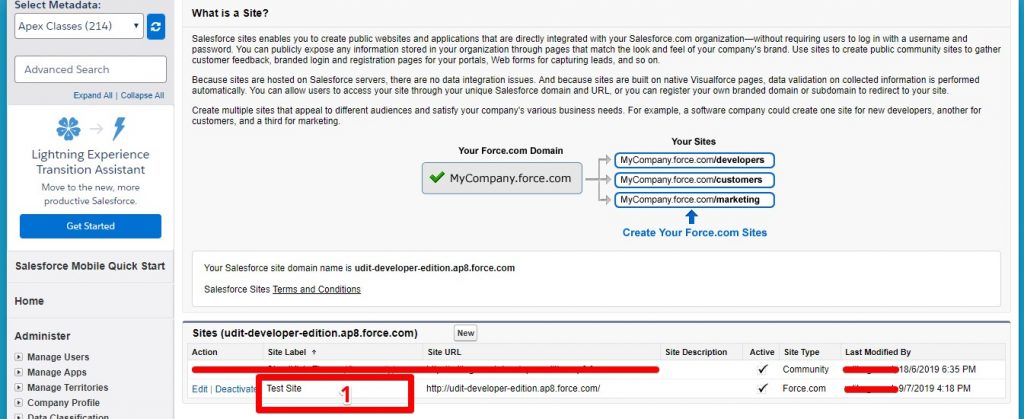
4.Create a site: Go to the setup and type site in the quick find/search and click on the site:
- Click on the New button.
- Feed your details into the site details.
On the Active Site Home Page, select your VisualForce page.
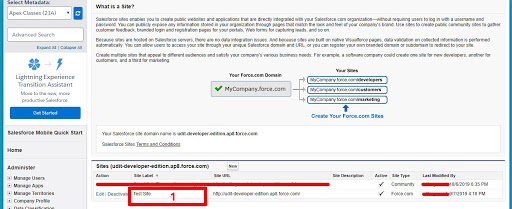
 5.Public Access Setting: Go to the setup and type site in the quick find/search and click on the site:
Click on the name of the site.
5.Public Access Setting: Go to the setup and type site in the quick find/search and click on the site:
Click on the name of the site.
- Click on the Public Access Setting from the top of the page.
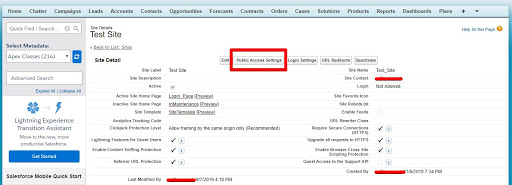
- Go to the Enabled Apex Class Access section and click on the edit button and add your class into the Enabled Apex Classes section.
- Go to the Enabled VisualForce Page Access section and click on the edit button and add your VF pages into the Enabled VisualForce Pages section.
6.Access/Permission: Go to the setup and type site in the quick find/search and click on the site:
Click on the name of the site.
 Click on the Public Access Setting from the top of the page.
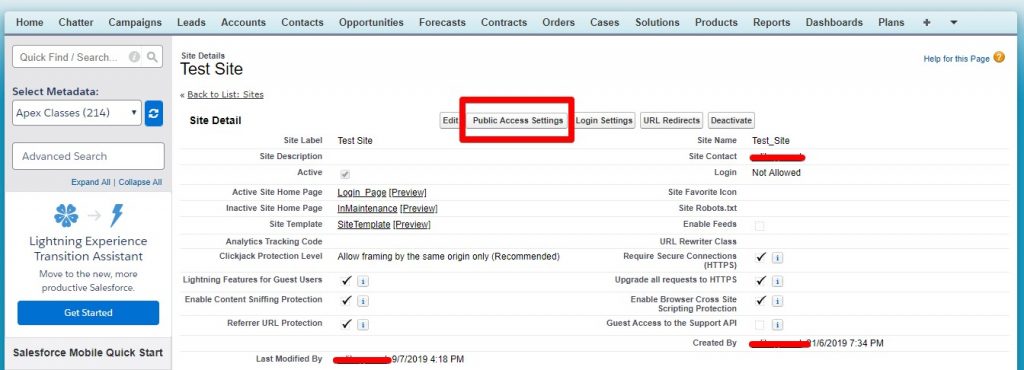
- Click on the Edit button.
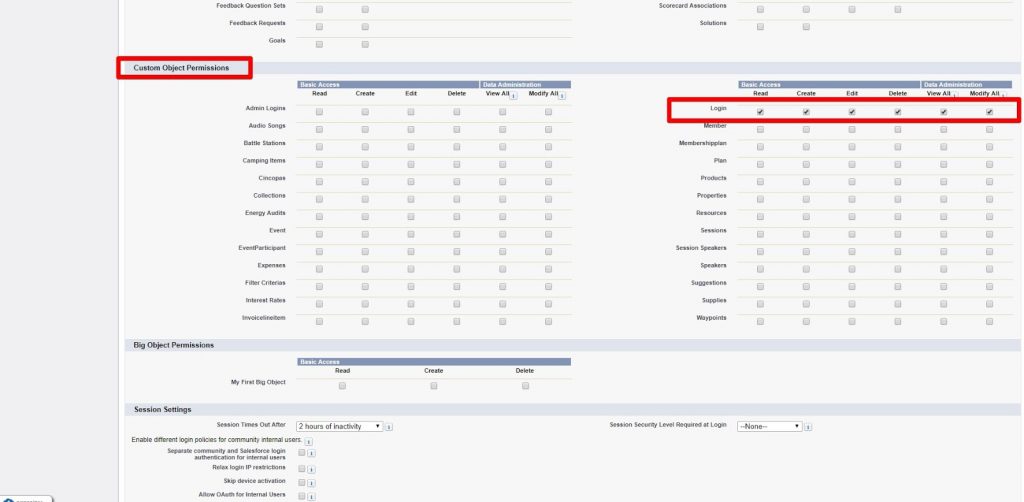
- Go to the under Custom Object Permission section.
- Check true for Login object and save it.
 7.Platform Cache: Go to the setup and type Platform Cache in the quick find/search and click on the Platform Cache:
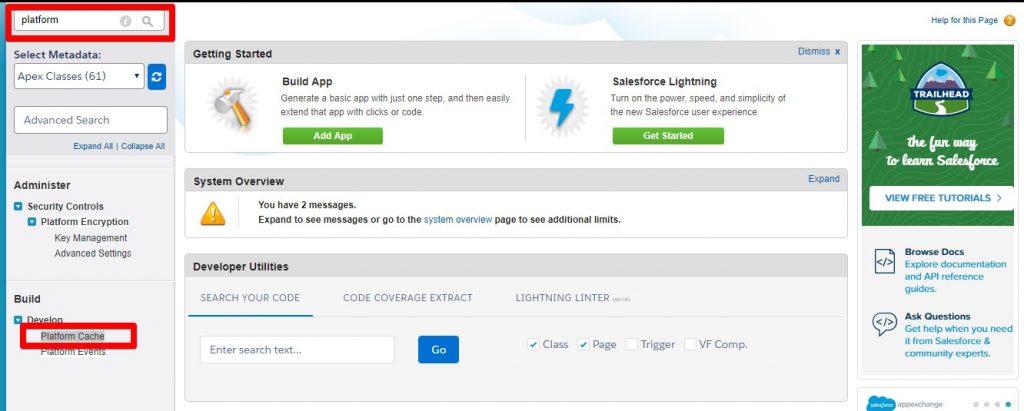 Click on the New Platform Cache Partition button.
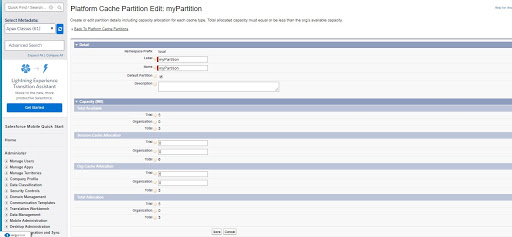 8. Update the code: Open the developer console and open the Visualforce page
 Login_Page.vfp and its controller Login_Page_Controller.apxc, then update the code as shown below.
Add Code Here: Login_Page_Controller.apxc
public class Login_Page_Controller {
    private static  String sessionId = 'Person';
    private Cache.OrgPartition part;
    String partitionName = 'local.myPartition';

    public Login_Page_Controller() {
        Cache.OrgPartition newpart = Cache.Org.getPartition(partitionName);
        part = newpart;
    }

    @AuraEnabled
    public static Boolean clearSession_Apex() {
        try {
            String sessionId = (String)Cache.Org.get('sessionId');
            if (sessionId != null) {
                Cache.Org.remove('sessionId');
                return true;
            }
            return false;
        } catch (Exception e) {
            System.debug('Get exception on line number ' + e.getLineNumber() + '   due to following method ' + e.getMessage());
            throw new AuraHandledException('Oops! Something went wrong: ' + e.getMessage() + e.getLineNumber());
        }
    }

    @AuraEnabled
    public static String isSessionAvailable_Apex() {
        try {
            String sessionId = (String)Cache.Org.get('sessionId');
            if (sessionId != null) {
                return (String)Cache.Org.get('sessionId');
            }
            return null;
        } catch (Exception e) {
            System.debug('Get exception on line number ' + e.getLineNumber() + '   due to following method ' + e.getMessage());
            throw new AuraHandledException('Oops! Something went wrong: ' + e.getMessage() + e.getLineNumber());
        }
    }

    @AuraEnabled
    public static Login__c getLogin_Apex(String testUserName, String testPassword) {
        try {
            List<Login__c> login_list = new List<Login__c>();
            login_list = [SELECT Id, User_Name__c, Password__c FROM Login__c WHERE User_Name__c =: testUserName AND Password__c =: testPassword LIMIT 1];
            if (login_list.size() > 0) {
                String conId = login_list[0].Id;
                system.debug('conId--'+conId);
                //if (!Cache.Session.contains('sessionId')) {
                    //Cache.Session.put(sessionId, conId);
                    //Cookie cook = new Cookie('value', conId, null, -1, false);
                    // Pagereference pr = new Pagereference('/Login_Page');
                    //Cookie cook = new Cookie('value', conId, null, -1, false);
                    // pr.setCookies(new Cookie[] {cook});
                //}
                Cache.Org.put('sessionId', conId);
                return login_list[0];
            } else {
                return null;
            }
        } catch (Exception e) {
            System.debug('Get exception on line number ' + e.getLineNumber() + '   due to following method ' + e.getMessage());
            throw new AuraHandledException('Oops! Something went wrong: ' + e.getMessage() + e.getLineNumber());
        }
    }
}
9. Create an application (login_form_App.app): Go to the developer console and create a lightning application with the name of login_form_App.
Add Code Here: login_form_App.app
<aura:application extends="ltng:outApp" access="GLOBAL" implements="ltng:allowGuestAccess">
</aura:application>
10. Create a component (login_form.cmp): Go to the developer console and create a lightning component with the name of login_form.
Add Code Here: login_form.cmp
<aura:component description="login_form" controller="Login_Page_Controller" access="GLOBAL" implements="force:appHostable,flexipage:availableForAllPageTypes,flexipage:availableForRecordHome,force:hasRecordId,forceCommunity:availableForAllPageTypes,force:lightningQuickAction">
<aura:attribute name="isLoginSuccess" type="Boolean" default="false" />
<aura:attribute name="Spinner" type="Boolean" default="false" />
<aura:attribute name="message" type="String" default="" />
<aura:handler name="init" value="{!this}" action="{!c.doInit}"/>
<aura:handler event="aura:waiting" action="{!c.showSpinner}"/>
<aura:handler event="aura:doneWaiting" action="{!c.hideSpinner}"/>
<!-- For Lightning Spinner Start Code -->
<aura:if isTrue="{!v.Spinner}">
<div aura:id="spinnerId">
<div role="alert">
<span>Loading</span>
<div></div>
<div></div>
</div>
</div>
</aura:if>
<!-- For Lightning Spinner End Code -->
<div>
<aura:if isTrue="{!v.isLoginSuccess}">
<!-- For Login Page Success :: Start Code -->
<div style="background-color: currentColor">
<div> </div>
<div> </div>
<div>
<lightning:button label="Sign Out" title="Neutral action" onclick="{! c.outFromHere }"/>
</div>
</div>
<div>
<div>
<h2> Login Successfully! </h2>
</div>
</div>
<!-- For Login Page Success :: End Code -->
<aura:set attribute="else">
<!-- For Login Page Start Code -->
<div id="login_Cmp">
<form>
<div>
<img src="data:image/png;base64,iVBORw0KGgoAAAANSUhEUgAAAMgAAADICAMAAACahl6sAAABNVBMVEX///8VccwSb8s0NDQ1NTUWXrUYV6MWXbIXWqsXWKcXW64Wcsz6/P74+PgYVqH8/PyoqKhfntw0hNPk7/kZUJQ7Ozs6iNRvb28YU5rIyMiPj4/w8PCwz+4ZTo8pfdDh7fgheM8aSYN4eHjl5eXc3NxqamobRnvS0tJxqeDw9vzZ6Pe/v7+AgIDO4fR0dHRMkthFRUV2rOGLi4uWv+iZmZm20++0tLSHtuUcP2zF3PKcw+ldXV1XmdpLS0sdPmi3t7ceN1lEfcPJ1eRikMgXY7FWVlYfNFIWaLyow+MxWo1tiay0wtN1n9OGq9k+XoU1b7VSg78gLkWnsLwrRmi6w8+Un697ip5fcoojXp2Pr9Bfir89b6w9RVOas808ZptUXmxfe6A2WIR3k7ZRb5FTfK4iTnyAkKbrlByzAAAUGklEQVR4nO2dC3faSLKAQTiJE4lIghgZJIOMJAuBAAMCDMZ2EuOQTF4z2c1Okp1kd++d2f//E7a61Tz0aCH5EZJzqHPsYwkh9afqqq7urm6nUlvZyla2cldiNZWh2M6pbBoLq+baYmc8qlubLlgSsZq9WqHMphmGSS8EDhiE0xk3fw4Yq99pq4yHIe3BSavtjlLhN13OaOFGw4JKYViFYXM1Jb/pwtLFUsS1FAsYttBpcpsucahY4zYbE4PAqGL/xzMXjJGAgqhlovxYKFw/OQbRyqT/A1Wwek29FoaLUqtvuvxErHEukW34SZjc+IdQSl28Xq1aQWGHmyfhlNwNMRCJOt40h9VRb4yBSHIbtpP6JH1zfWCS3kY5RoUABkskKUh7k1ailFc52Nl0/9Ph0dEJkaOjT58+TWezNDWCXAXJVTaGwfWWjQcwHBydnJ+fP8Xyt3e//+Pjh78jef3181sRYvo1MEy5uTGO4ZxjNn1yuNDDycm7Xz48lz1Retaq94eTclQktjkQbui2HkgXh0t59ctrSnjO1ZVagcqysarFdRAHM7u//2RFvn2uR3aY8kotF+7mmMlmjB30gTAe3n+8Iv/8HOOt1nuhwf6G3C/imAHGqkzfxGzTrH6w+7WpmqWoswcPvfJrgmicG4neaHlTIYrVfrDrxZi+SdYDB5SVSHNjQWNzuuuV9y8TF4RT2qR+MUy5t6Fm/eWjFdndffTrtdqA/BBaljQaUNlYW+gBefTo8roDO3Vl3Bv3NxebpEbTByvy9scaPkgi1q/3Fhizz5vv3F1f+rN7RGYvN12WGGJVmn2oxb3eWBnVrdUXz/cIyfu1HFy+jm4yhLv0m5Xvrz0I8Tp4UgBFVOm0Wi6Iw9HSqLmXz2b3Zs/ermnMKxD0FsoqiuHB1+KxeKX+HWH4em9S9vaH0IFa6CyHOPMjZRRt5ShCRGGV9yZseTL+Tv1zblQrU7pBjNoex/S19SElZoeTudro7tWC46CIDlC6oMS4S2UYNWYHyhVHd8yxfvAzRoBnjQtreukQlnTusiHk4gx+MuU1b7MpxhhDYZiCcmezVvlarNE2Royq4XzcoUdGHd5RTNBsxyxBOcLtWHhMgp0hmcJPhHKY9ORO/FfIaBtFVHrdsmrAsHt/H7ryByCHhwcH+1MqDdO+g8C3H38wmu1TOd48evh4H2FgDgA5QnK4T2FhCrdOMkowqE7ViHWJRiM8IIjk5OT85HAainLrJM0kkwMFSqNoXT6kgZw/fXr0KZSkfatuOE+xc8aNkrwfMkMqBx0EDaYeTcMeMblF38XVwoMJFOaBQNyXXrYvTCH8HSKOSJAXL54ezkKeM7y99mQcrL84RlSaeYvjrDweunVRoCELtxDrcnd3jUZevPjtPKgURo0T9MSSetBAApP5XBNHgWyZMgeLOGKA/PbiU+ClMTSbSyrBisWwYkh8mu+Px7TuhHWJxlMiQJ4SkN9+OwySUIwuqfT9cWLy+WLr8gEdBE01/P7fjx8+fPj4+7+A5CgAcjtzCtbEr5DE7S1wRID89e/XGnkxvFz8xx8hJLXb6J/0fapmEkdA1uW9CJB/P/eWUu/+cXgXKuFEXyuRuIUCDjrIq6/ZwBeK//K3jUzn5iDNshckccwA9YoO8u112Fe0331e+DamFYbeOyZ26nnEQQP59jz8S/IvvpaRvfG8guULTpKaHXDQQWgcQPLFb5ij/M0MfuTxvYlTKRAHFYTOkeJe+jujam4yXDPAFCk979RRwqYJc9BAqBxcs9cuB5tFBo02XdtWPD4rqRvMXz6ig9A4rL5IGzdDo02968Urlqd/Gz2sEMZBB6FwcP3JmkzUwvg6Fazudb6JfAfioIJQOJri2qRBCPSu0TyOVm2OUZPcIX+5Swf5ZzjHuBynI3qd3EDFY3NJ4mngoINQOJSYWWoM20lavTxOK0keBeKgglA4/G1WBElaTOi+hl5bT8ZBAXlM4Ug1k6QNJgz5vCC12BxfHtJBaByBODtaKclIrgdCOMJBqBxez7KeZJKkRbkWCHDQQegcqXzsQVlSnAQW3/O+g1jGjjioIBEc6GmExJ1TXEfCJgiYxh6QQpxXgDloIJEcKavjzouy5XZtOK75FBBUiUodZA6Ix/5iNYjAcZ8KEs2Bgt5JDk/tojfmqdZpthzMTKeNBYZI0xvFr89jy3+5f58K8n4NB0LJV4jauba3AzEat28wUOS1v/VGgjloIDE4VsQb5qEMZjT36AOJ3QXmvGNBEVM4WKwvjx9TQZ4li/V63iLj4YdKzT+kEzvX0VtRGTE45rEi+S+P71M1kpDDH6+4gXf263uflcRtTHytrRqVXEL0EQ6SkMMXri67dB+8Q0Vs3MGQvHcAm4mo59aXfTpIUg6fQpj2wvMLf62OsDC1uJMOvhFs5k+dcmH+yz4dJCmHbxRq1Ray9vkKSXxz90dy0/8PJ8l/eUIHSczR9/awPIMF2h8nKySx61agk7D/7u8hlz3/8wkdJDFH3ednvYMFH178tXy78UdTvW4QXsHh3z5qftqv355QQe49SzrqXfe/PG8sIr97cbgEaccNHSsFH8ns6PzdR23FxvJf/zw4OKCCBDm4+mgUkWDWbPue6J8Q/Xh+vvBdTDl2mOJXCSI5R6tAKrJl5Z+//r9veByXBhLg4JRJWVXLIi3JvB+I5v0Dzs9fnZwshrnXNdJLCc5NA8nJyclf/3n37t2rV2hZSARIgCNfwxlnDGXJZyW4Ti4wnJb98/DoYGEm8ceogoMbLombfhENEtTHwp8zTG7orxaVXjCVK2R88/OTg8O5ShIM43K+ngEiOYwHErSP1RYbUGr9RWopl+93coEngXcJxlP9x/sHT8iNkkwCVYJ90NlBHJAQO/dGoWgzgUmnN1bGvc4kFzpYyohBt1SfPtx/Mp1/Hh/E3z5hmR6drAMJ8buVwJ1ItiptER9TCLEk69mD3fv3yQWJVi2NQ4ZkZwfRICH6SDh2laYlFnKX9+49eji7Bsh8EZtH2OlhFMivYU6pmWxlO22q7w0KRO9dAyScBFAOqCChHNDlTMZB8a1vccY6cw2QlQWSPpT9gzCQh+EcgWg6mqNMiwhfroAkMXZM0qPUitl0/8kC5LELsktd/eKf7o7iyFGHe/oPMAm+KvkcPD3RlZ1Np/cxBTA8ms3UiGH/ML8RihGVmtmcLUGukXKzZtcD1EJhT5pToqqtsi4P2+VQhxHd8fpsWbeus0Qlzj4U67fNqAzLa7fdYdv9qD5s/v0CJH7Q6JF6J7oQDBtnI5NmLXLGE03eRvcyrGfugqGbZHc0Ozn6XkxqzK1lotZuMOz6OWj+8h4xkpssR6738MZS/uejJYMJchPC7oJvIsZ5F8rCbd1oObI16kGIR7Jl5wPonaQ7SVnNnpgjC5MWo/Ax1yZxb1yQm2fTcpXReFiboHTZidjp9a+36RqXbyrDjihOJmJtOE5yE+vtFEDU2m0lbnKWZd08T4/juOTJvfWXvfEPugXXVrayla1sZStb2cpWtrKVrWxlK1vZys8jWb14MWjockofDAb+nJMokeF6M3DWGilKgr2+RuNx5Eh+gtJIZ3s7O3vHdkrIZPaKCb6qH2cyJd85a9xW2TSbi7tbCycyt7NW2pT2MpkdkIzBC5mdm4JYNXa+yD1eohNahhoBwsUdiGycZXYyQLJ3OyBcB+WcsGjvqpipxmtARu1hrIwpE3HsSUKjIdj2LYCgNYysqCjDMhNzpm8NSIeJtVxNPgWOqwZOiOXl1M1BasCBt4rsl5l48zHRIJUcE2upqwCmcbpMWLwxiNVeWC7UsVgJ+dEgvXirvEAhmeOVki9BeFnXNTdzmddNk7Bm4U+ZfFU39WwAJJ9j5nPgyjKJ0qo3PZMHnuMVEK7SbOZXhui5ygheDJ7B5erNJtGv1WwG/u9KERyWvfLNBYhpXx0fnxkDhCIbe3st9yLz7HhPQH/opVP0eTcMhCydUVgC0uwUymq5vZghrPTa+DjvA+GUSU4t5xb7hXF9NCVEFlFXCqpK5qQVVS37VY0KfuE7BhBegAIi2atqrtoMVzkmgCOQxpX7ObjtEI1wWMZEI0qObAlDdikYFchcFZlSn4PgLDu8r527HavVIZOneKuqCpgc8R0KeEV/doQDNWu1ZSYgwh52yaiYLdkDcoxBiq7Lxs1PEKTcxlJwQRRwY2RvG7zUC23kQ47dZCYCYokMyXticNYZ10kz5DgNZGD0CxA2nfaDlABkNTfZBdGhnDtXXQdayp0dIQgiG8BxZjvV4zCNLGYZMQjKX2NynSFaxopKgrbFYHK1oYjcM14oT0DGeJp72CmQNCe0DwjbHg7bLF7FswYENLIX1EgJyonqVBY0kzmVs36QC2g8T+FrPG5MAyBLAZAe0kQdGQDUjXIdJXm7Tf4I6a45B7FQzjSLzChfw6kmeNsJlBRiDVmUqbkGZLCDXrkPBBX8DIeOvI1AAyBdONtwrw/TSHuMRKlhEAikSBrZkEHH8JukY6E9fYYLkKY6b/hAh0zBQnXUTVNGHj1XWQOC3KexsjwEg8hgyVV+DrrXCIC0MpkrefH9SK/FteflwSsOewgs57qretn9yAVBmiINXw1dUl8aN2Jv5qNBshKUfEUlC5CWD+TUBSlCpRJS1QWIGdWOzEFImkJTRUk9HhDcYi5BejQQxgUhb2jMBEFSDbCC48GiJXGrlgFVC7sAvoptqLrwbWA9OxdQtXZWqtZq1VwPgiqY2wigqoXK6oKggi+rVtutWpjYrVo4ZMAtIraeAEjWRjFjV4cXzmvFFWNvLY0dnc0YQMYPjjFiA/RyRYzd677Xg2BjB6Ph8f52KJxZMXbUYOTFpbGjzACr46Zld+bHPZRZFcyy05ArzRwbdrd6Ng/jkfvNXHVLhut+U9oVPnZaqHnp8nP3W2qB+/UEBjFAsPstE/eL3cHc/UL52HbHdb9Nsg1TodMh7tfNwit0hhPc3QlJF9RaO6R1W/ZHFg0iWD0yjsbxvAHMnCJ3tmwQ3eMEIHiHPtIgok3TRI4nDWLNbRBR8hduEFFmKGmO8P5nOCtxnpETlvcoO2eZJUhmxxOi2K5RX5BLdgy3+SxeeY9DQeChrtdyQaCnguO//iJEQREhNC0TN2C2airhc3dax9tUuiDYC3C9MrNIeQ5P4NSF1tXZ2ZUhpBqtVhUXzeyioLF1MXfNOj42BHmuR+f0bPV4LlZNFInzGYmiOOKGokh2sq+L4gQ/vzJsl8s4aFTQJameKOJ0SE4Rc+VyoTYPGvmRWIALlwnNoxoc58RaiPudCy9rGg7aeX5e5ZdhPOVY8x7P77S4AfnTf4xx52H8/BLyAZev1+edjxGEAzwc16Hc82Vu6LiC3C99e8sfTqxCmagm3140Pe4nE2aD/ysmsfgbxPl5Dq14jb/GavMC3nae3ItDFHKaQ6tNgt2RH1hQkOj6bW7CLDfhRdsBMWznJ0o9Q82kivwwP1ZXqhKAMOW72tz4bqSvorRoRcEbci+ySi2x3fl5DB0LXmCG23JPVuktJFN+b4Ho0R1ETk82+F88bkOsXkFlWXVdpvnPIGii5SZ70G1lK7ck2bv+79Xf579jy0K1u+geaULXaQx8V+gCKQlfdLqNiBtpoS9FFuwSeUDxgpyRw18fery/ixNbnGrDaZFvm1JXaAi27xGNKplfcAxHCE7iLgos6Sm5G/xcaA0cye0RC123vHAod4P7SOiSLVyEdHJiidwq4h8k2Sp69wMbzsopHt0RfrLyHKTodmx5OQsfZoEd/4G6Tujt8ppkZrMNjc/if+HIuzdAN22k+IaGvyZ08ZW6pMNd5RS6kkfnXcnaDn6F+DT6lXUVl3XPgZATodqUW3qKr7ogpoQ0M+jKjtS60EtySitpjZYkERDHwV9wpGpDL3UlwZFsvSHwgiM7aMRCaJVAuYNSSSppvFCSG2TEy6kWdR46y3D1oOuY6EoJVQOtWIUrBadabcwVgvXmni61ugNbErSuptvFlGlLtnPhwAkZ3yGkgstSUdOJRsxWFoMILbNhCFDfNKlhXJhVAtLFJROq5sBAV5xKRccWurxedWy4cclpFU34u2qaYGdGkSf1CCyiVC3JYCcOXIheWddpmaYuNaSBaZdswbwgQxjue9QNOO3YA7N7JhSNgaTLgmRKgmkbTtcstgT0rK4Q4ACNOC3pygXRDFTDB7YN5t61EUjLsZc2IthZt6akbBtOwd00qQSlvagSEB0+deATs9UF5QlkMDWLxpwEZEBSt+uCIBtpOVU+VZSqy3JpBipGA59uNVKmIaecEnwvC6rOpootB254YVdpIJK50EhKAPXIA9vpyro0kBpZ9NvkiwQEsHRZLpVkU0LFLWGQU1PuOvAFuSTYgqxhEB0KqWlVohGhmNWki+og25CcLnxb7gpVAd3aMGXHxu9AWHm8iU9DcZGCnK7hyEXjwjB5s4pAGrZ7hxCQKtiITUCygmTYQkmzJcPJNgypVIX6oBVtYo66bUgDvSoZAjrlDFKa7VwZkq3BF0CNpiRBTYFP9KpeMqQrohG4hVHKFiXJaAwc+LZtX8CBU9UFQ2qZyJ87wsrjNThdNbtFuIsMWjVOJWPACy3dtAVQc6Orw7MkfwuRQs4GqX7h82Rdl0HvJphnSjM1jefBDWnLi3UZf5jV+JQGng0cv47meeGcJru/4RP4NKvrznycXi6aWXy3lHtruBLdOsujr8IB/lk8np+fRs+AmlGE76VwKWQ0oYnvYIeA3FDmFu2XLNTX23gaapz8p7SiQW/NriuNkNqKnwZO5tpt9Op9uoG0K12SBrcf9PCUhpiXtdt5WLDt47XbeENb2cpWtrKVrWxlK1vZyla2spWtbGUrW/kZ5X/3jOELD3AYhAAAAABJRU5ErkJggg==" alt="Avatar" />
</div>
<div>
<aura:if isTrue="{!not(empty(v.message))}">
<h2 aura:id="messageFontColor"> {!v.message} </h2>
</aura:if>
<lightning:input name="input1" aura:id="username" label="User Name" />
<lightning:input type="password" aura:id="password" label="Password" name="input1" />
<lightning:button label="Log In" variant="brand" title="Log In" onclick="{! c.validateJS }"/>
<label>
<input type="checkbox" checked="checked" name="remember" /> Remember me
</label>
</div>
</form>
</div>
<!-- For Login Page End Code -->
</aura:set>
</aura:if>
</div>
</aura:component>
11. Create a controller (login_formController.js): Add this code into the controller.js and save it.
Add Code Here: login_formController.js
({
    doInit : function(c, e, h) {
        h.doInit_helper(c, e, h);
    },

    validateJS : function(c, e, h) {
        var testLastName = c.find('username').get('v.value');
        var testPassword = c.find('password').get('v.value');
        if (!$A.util.isEmpty(testLastName) && (!$A.util.isEmpty(testPassword))) {
            testLastName = testLastName.trim();
            testPassword = testPassword.trim();
            c.set('v.message', '');
            h.validateJS_helper(c, e, h, testLastName, testPassword);
        } else {
            c.set('v.message', 'Please enter a valid Username & Password!');
        }
    },

    outFromHere : function(c, e, h) {
        h.outFromHere_helper(c, e, h);
    },

    clearBtn : function(c, e, h) {
        h.clearBtn_helper(c, e, h);
    },

    showSpinner: function(c, e, h) {
        h.showSpinner_helper(c, e, h);
    },

    hideSpinner : function(c, e, h) {
        h.hideSpinner_helper(c, e, h);
    },
})
12. Create a helper (login_formHelper.js): Add this code into the controller.js and save it.
Add Code Here: login_formHelper.js
({
    doInit_helper : function(c, e, h) {
        try {
            h.showSpinner_helper(c, e, h);
            var action = c.get("c.isSessionAvailable_Apex");
            action.setCallback(this, function(response) {
                var state = response.getState();
                if (state === 'SUCCESS') {
                    var resp = response.getReturnValue();
                    //console.log('resp-->> '+JSON.stringify(resp));
                    if (!$A.util.isEmpty(resp) && resp != undefined) {
                        c.set('v.isLoginSuccess', true);
                    }
                    h.hideSpinner_helper(c, e, h);
                } else if (state === 'ERROR') {
                    var errors = response.getError();
                    if (errors) {
                        if (errors[0] && errors[0].message) {
                            console.log("Error message: " + errors[0].message);
                        }
                    } else {
                        console.log("Unknown error");
                    }
                } else {
                    console.log('Something went wrong, Please check with your admin');
                }
            });
            $A.enqueueAction(action);
        } catch (ex) {
            console.log(ex);
        }
    },

    validateJS_helper : function(c, e, h, testLastName, testPassword) {
        try {
            h.showSpinner_helper(c, e, h);
            var action = c.get("c.getLogin_Apex");
            action.setParams({
                testUserName : testLastName,
                testPassword : testPassword
            });
            action.setCallback(this, function(response) {
                var state = response.getState();
                if (state === 'SUCCESS') {
                    var resp = response.getReturnValue();
                    if (!$A.util.isEmpty(resp) && resp != undefined && !$A.util.isEmpty(resp.Id)) {
                        c.set('v.isLoginSuccess', true);
                        c.set('v.message', '');
                    } else {
                        c.set('v.message', 'Please enter a valid Username & Password!');
                    }
                    h.hideSpinner_helper(c, e, h);
                } else if (state === 'ERROR') {
                    var errors = response.getError();
                    if (errors) {
                        if (errors[0] && errors[0].message) {
                            console.log("Error message: " + errors[0].message);
                        }
                    } else {
                        console.log("Unknown error");
                    }
                } else {
                    console.log('Something went wrong, Please check with your admin');
                }
            });
            $A.enqueueAction(action);
        } catch (ex) {
            console.log(ex);
        }
    },

    outFromHere_helper : function(c, e, h) {
        try {
            h.showSpinner_helper(c, e, h);
            var action = c.get("c.clearSession_Apex");
            action.setCallback(this, function(response) {
                var state = response.getState();
                if (state === 'SUCCESS') {
                    var resp = response.getReturnValue();
                    console.log('resp-->> '+JSON.stringify(resp));
                    if (!$A.util.isEmpty(resp) && resp != undefined && resp == true) {
                        c.set('v.isLoginSuccess', false);
                    }
                    h.hideSpinner_helper(c, e, h);
                } else if (state === 'ERROR') {
                    var errors = response.getError();
                    if (errors) {
                        if (errors[0] && errors[0].message) {
                            console.log("Error message: " + errors[0].message);
                        }
                    } else {
                        console.log("Unknown error");
                    }
                } else {
                    console.log('Something went wrong, Please check with your admin');
                }
            });
            $A.enqueueAction(action);
        } catch (ex) {
            console.log(ex);
        }
    },

    clearBtn_helper: function(c, e, h) {
        c.find('username').set('v.value', '');
        c.find('password').set('v.value', '');
    },

    showSpinner_helper: function(c, e, h) {
        c.set("v.Spinner", true);
    },

    hideSpinner_helper : function(c, e, h) {
        c.set("v.Spinner", false);
    },
})
13. Create a style (login_form.css): Add this code into the controller.js and save it.
Add Code Here: login_form.css
.THIS {
}

.THIS body {
    font-family: Arial, Helvetica, sans-serif;
}

/* Set a style for all buttons */
.THIS #login_Cmp button {
    color: white;
    margin: 8px 0;
    border: none;
    cursor: pointer;
    width: 100%;
}

.THIS #login_Cmp button:hover {
    opacity: 0.8;
}

/* Extra styles for the cancel button */
.THIS #login_Cmp .cancelbtn {
    width: auto;
    padding: 10px 18px;
    background-color: #f44336;
}

/* Center the image and position the close button */
.THIS #login_Cmp .imgcontainer {
    text-align: center;
    margin: 24px 0 12px 0;
    position: relative;
}

.THIS #login_Cmp img.avatar {
    width: 30%;
    border-radius: 50%;
}

.THIS #login_Cmp .container {
    padding: 16px;
}

.THIS #login_Cmp > span.psw {
    float: right;
    padding-top: 16px;
}

/* The Modal (background) */
.THIS #login_Cmp .modal {
    position: fixed; /* Stay in place */
    z-index: 1; /* Sit on top */
    left: 0;
    top: 0;
    width: 100%; /* Full width */
    height: 100%; /* Full height */
    overflow: auto; /* Enable scroll if needed */
    background-color: rgb(0,0,0); /* Fallback color */
    background-color: rgba(0,0,0,0.4); /* Black w/ opacity */
    padding-top: 60px;
}

/* Modal Content/Box */
.THIS #login_Cmp .modal-content {
    background-color: #fefefe;
    margin: 5% auto 15% auto;
    border: 1px solid #888;
    width: 25%;
}

/* Add Zoom Animation */
.THIS #login_Cmp .animate {
    -webkit-animation: animatezoom 0.6s;
    animation: animatezoom 0.6s;
}
14. Output video: URL: https://embed.vidyard.com/share/9rvnh6cvtPgEfTbaZY7L3E? If you need assistance with your Salesforce customization, integration, data migration, or implementation or Apex solutions, Cloud Analogy -- one of the world’s leading Salesforce Development Companies -- would be the right choice for you.